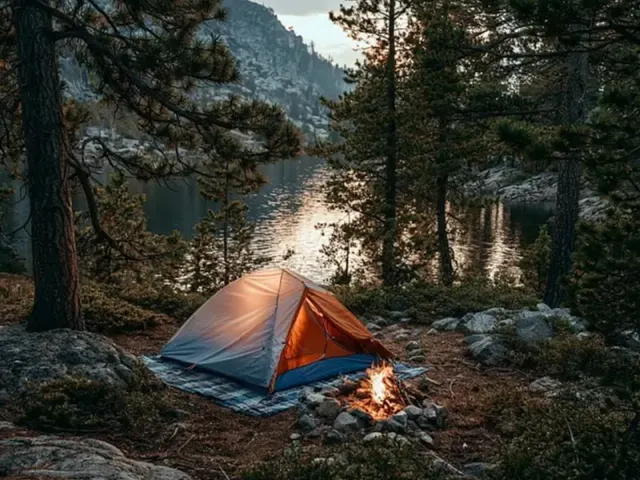
How to Choose a Tent Camping Aesthetic Wallpaper
There's a certain quiet pleasure in pulling up a photo of a tent bathed in warm lantern light on a chilly evening. It's not just a picture—it's a promise of the next trip. Whether you're scrolling through your phone at your desk or glancing at your laptop between meetings, a well-chosen tent camping aesthetic wallpaper can transport you right back to that pine-scented spot.

But not every image works. I've tried dozens, and the difference between a wallpaper that feels right and one that just clutters the screen comes down to a few specific choices. Here's how to pick (or make) one that genuinely fits.
Start with the Focal Point
The best wallpapers have a clear subject. A tent, a campfire, a lantern, or a view through the tent door. Your eye needs somewhere to rest. I look for images where the tent occupies roughly one-third of the frame—not dominating, but anchoring the scene. Too many elements—like scattered gear, multiple tents, or busy foliage—create visual noise. On a phone screen, that noise makes icons hard to find. On a desktop, it competes with your open windows.
The One-Tent Rule
Stick to a single tent. Two tents split the focus. A lone tent against a landscape—whether it's a mountain ridge, a forest floor, or a lakeshore—creates a sense of solitude and calm. That's the feeling you want when you glance at your screen.
Color Temperature Sets the Mood
Warm tones—amber, gold, soft orange—make a wallpaper feel cozy. They mimic the glow of a campfire or a lantern inside the tent. Cool tones—deep blue, misty green, gray—evoke early mornings or rainy afternoons. Neither is better, but they serve different moods. If you use your phone mostly in the evening, warm tones feel inviting. If you need a calm, focused desktop for work, cool tones work better.
I match the wallpaper's dominant color to the season I'm anticipating. In late winter, I lean toward warm, fire-lit scenes. In summer, I choose cool, shaded forest images. It's a small trick, but it keeps the wallpaper feeling connected to what's ahead.
Composition for Your Device
A wallpaper that looks great on a 27-inch monitor will likely fail on a phone. The aspect ratio matters. For phones, vertical images (9:16 or similar) work best. The focal point should sit in the upper third or center—where your clock and notifications live. An image with the tent at the bottom gets hidden behind app icons.
For desktops, horizontal images (16:9 or 16:10) are standard. Place the tent slightly off-center—either left or right—so your desktop icons can cluster on the opposite side. I avoid images with a perfectly centered tent because it leaves no room for files and folders without covering the subject.
The Common Mistake to Avoid
Don't use a photo taken at noon. Harsh overhead light flattens the scene and washes out color. The best wallpapers come from golden hour—the hour after sunrise or before sunset. The low angle of the sun casts long shadows and warms the tent fabric. If you're taking your own photos, plan for that window. It takes patience, but the result is a wallpaper that glows rather than glares.
Weather and Terrain Considerations
The wallpaper should match the kind of camping you actually do. If you camp in the desert, a lush green forest wallpaper might feel disconnected. I keep a few different wallpapers saved—one for pine forests, one for open skies, one for rainy scenes—and swap them based on my next trip. It's a small ritual that builds anticipation.
For safety, remember that a wallpaper is just a picture. It doesn't replace checking actual weather and terrain conditions before a trip. Use it as inspiration, not as a guide.
Where to Find High-Quality Images
Free stock photo sites like Unsplash and Pexels have extensive collections of camping and nature photography. Search for 'tent camping,' 'campfire,' or 'forest tent.' Filter by orientation (vertical for phone, horizontal for desktop) and resolution (at least 1920x1080 for desktop, 1080x1920 for phone). Avoid images with watermarks or small file sizes—they'll look pixelated on modern screens.
If you take your own photos, use a tripod for sharpness, especially in low light. Edit for contrast and warmth—most phone cameras underexpose campfire scenes. A slight increase in exposure and a touch of warmth in editing software can make the image pop.
A Quick Takeaway
Your tent camping aesthetic wallpaper is more than decoration. It's a daily reminder of the quiet mornings and starry nights waiting for you. Choose a single, clear focal point. Match the color temperature to your mood and season. Fit the composition to your device's screen. And if you take your own photos, shoot during golden hour. With these few guidelines, you'll have a wallpaper that feels like a window, not just a picture.
Frequently Asked Questions
What makes a good tent camping aesthetic wallpaper?
Look for images with a clear focal point—like a tent or campfire—and a balanced composition. Warm tones (amber, gold) create coziness; cool tones (blue, green) evoke calm. Avoid busy patterns that distract from the subject.
Can I use my own photos for wallpaper?
Absolutely. Your own photos carry personal memories. Use a tripod for sharpness, shoot during golden hour (just after sunrise or before sunset), and edit for contrast and warmth. Crop to your device's aspect ratio (e.g., 9:16 for phones).
How do I match wallpaper to my campsite theme?
If you camp in pine forests, choose images with deep greens and browns. For desert camping, look for warm oranges and sand tones. Consistency in color palette makes the wallpaper feel intentional.
Should I consider screen brightness?
Yes. A wallpaper with large dark areas can make text hard to read on bright days. For phones, pick an image with a lighter center or upper area where icons sit. For desktops, a darker background reduces eye strain.
Where can I find free high-resolution camping wallpapers?
Sites like Unsplash, Pexels, and Pixabay offer free, high-resolution nature images. Search for 'tent camping' or 'campfire night' and filter by orientation (vertical for phone, horizontal for desktop). Always check license terms.